CORS Explained: A Beginner’s Guide to Cross-Origin Resource Sharing

Aditya Trivedi
Author

If you are a developer and if you have ever worked with APIs, you would have definitely come across CORS issue. And yes I get it, it is very irritating issue. Don't worry, by the end of this blog, you will have a complete idea on why do we get the CORS error and why is it so much important on security Point-Of-View.
Understanding the Client-Server Architecture
Whenever we talk about web-development, there are 2 terms that we talk about i.e client & server. Now, the client can be anything from your React Application, Django Application, anything.

The client-server architecture works like the client sends a request to the server. In return, the server returns the response to the client with the data, the client requested.
Understanding CORS
Consider a given example, you have a simple react-based application which is a client application which is hosted on adityatrivedi.in , whereas on the other hand, I have opened another tab which is www.facebook.com and I am logged in on Facebook, along with the login credentials, cookies, etc. Now, Facebook would be connected to its server. Whenever a post is created, updated, get, there would be a request made to the facebook server, right ?.
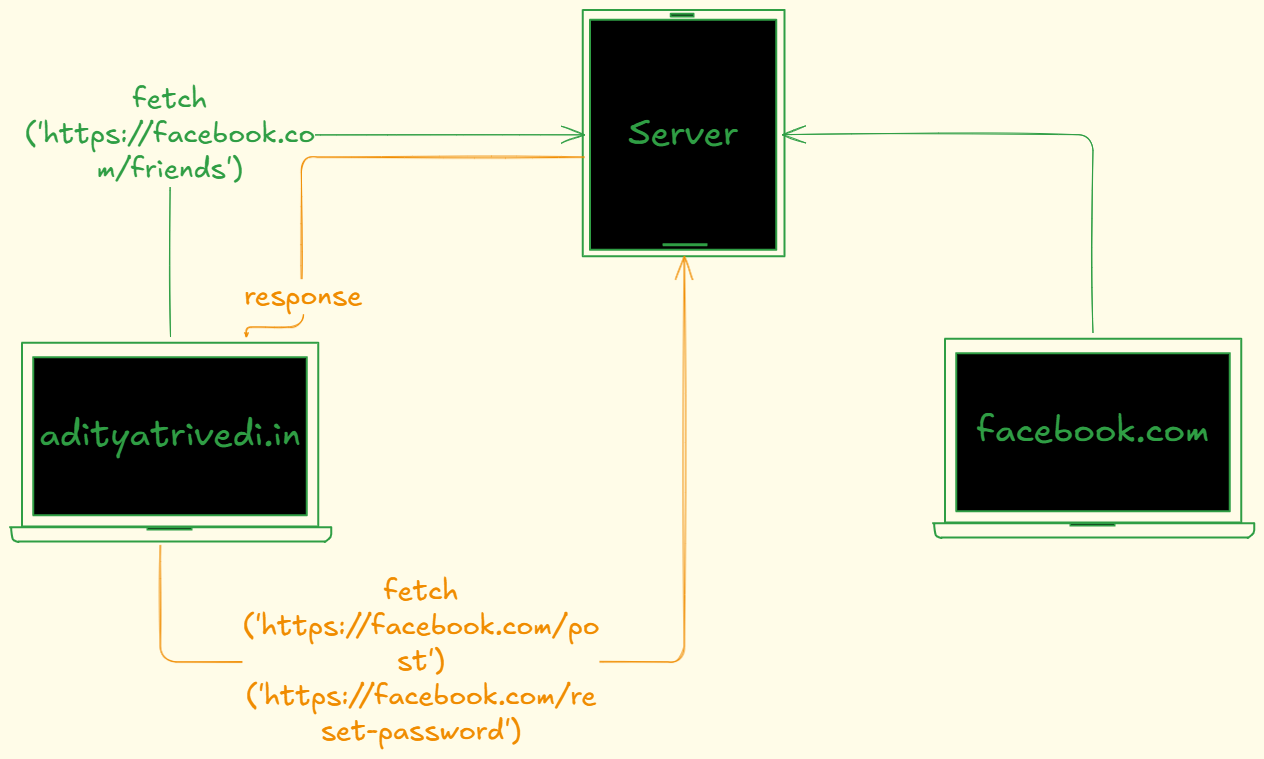
Now, say I am on my react application and I make a request to get the list of friends I have on facebook. For now , consider the api request is like:
fetch('https://facebook.com/friends')
Now, since facebook is already on my second tab connected to its server, this api request will be made to facebook's server. Since we are logged in, on the same browser, with the credentials and cookies, this request will be made to the server and the server will return us with the list of friends.
Ohhh!!!, now this is an issue 🥲, if this happens, then i can easily create a post, reset password, etc. This becomes a huge security risk now. What if the same thing, instead of facebook, say we are logged it on a bank application. Now, this becomes pretty scary as anyone who would go to any third party website and say makes an API call to the bank to get the bank balance, the bank server would easily return the response and make you vulnerable. So this becomes a huge risk for any website to not share their data if any api call is made from third party sites.
This is a Cross-Origin request that is made, where there are 2 different origins that are able to communicate with each other.
This is where CORS (Cross Origin Resource Sharing) restricts 2 different origins from sharing their resources, meaning facebook.com should not be allowed to be called by adityatrivedi.in .
Let us first understand what is origin as per browser. The origin is the unique identifier of the website or web application making an HTTP request to a different domain, protocol, or a port. It is made out of 3 components:
Protocol (Schema) - Method used to access resource (http:// or https://)
Hostname (Domain) - Domain name or IP address of server (adityatrivedi.in in this case)
Port number - The port on which the server is listening (eg 443)
In this case,
All of these will be the origins, we won't consider the paths. But if the website is like https://api.adityatrivedi.in , this would be a different origin, as the hostname is different. Methods like fetch() follow the same-origin-policy , meaning that a web application using those APIs can only request resources from the same origin the application was loaded from unless the response from other origins includes the right CORS headers.

Now, whenever we make a request from the client to the server, it will add the origin in the Request Headers which will help the backend understand that where is the request coming from. The backend server will now have the decision on should it accept the request or reject it. Now as per the browser, it says that if the request is a cross origin request, when the server sends a response, send the response with a Response Header Access-Control-Allow-Origin: 'https://adityatrivedi.in'
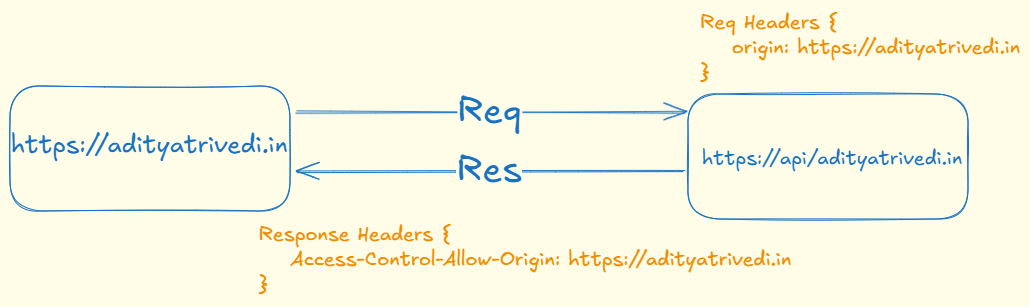
This means that the backend server trusts the origin and will allow request from that particular origin. Let us now create a very basic application to understand the entire concept.
Creating a basic application to understand this concept
import express from "express";

const app = express();

app.get('/data', (req,res) => {
    const dummyData = {
        name: [{ id:1 , name: 'Aditya', email: 'letstalkaditya@gmail.com'}],
    };
return res.json({data: dummyData});
});

app.listen(8000, () => console.log(`Server running on PORT 8000`));
Now this is a very basic server that we have created along with a Vite frontend. As you see the frontend is on localhost:5173 and backend server on 8000, would there be a cross-origin request possible ? Let us check,
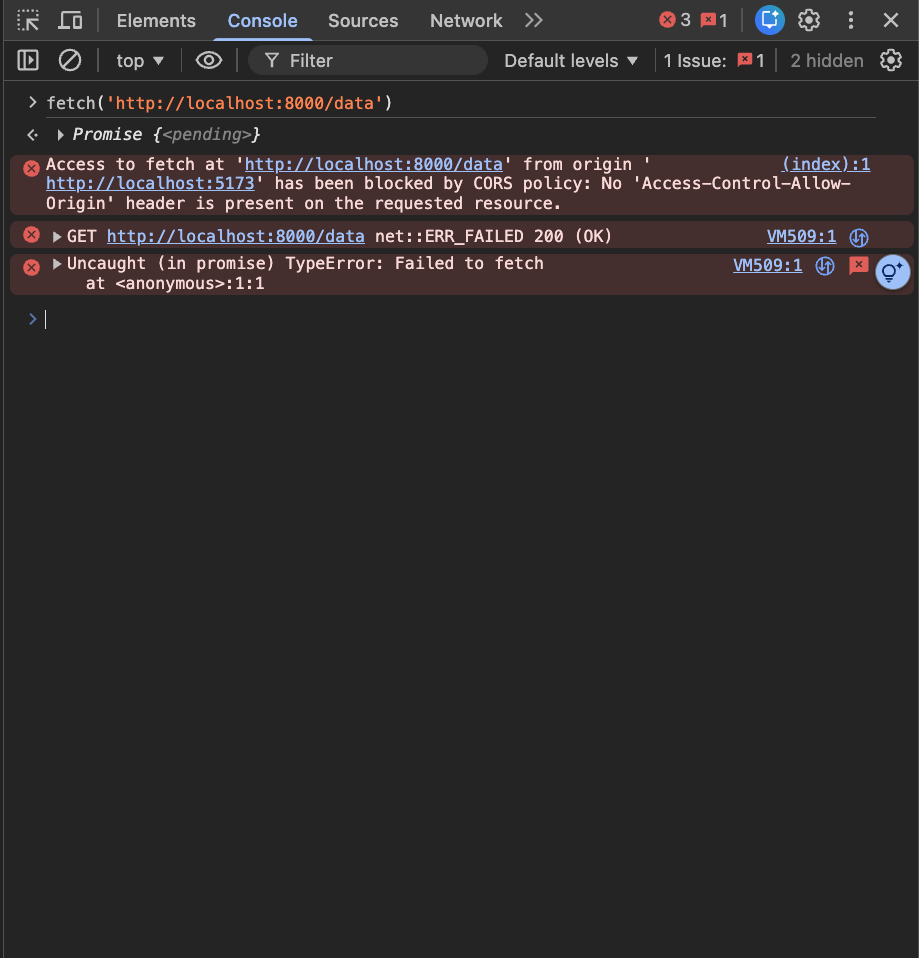
As we see, there is an error that we get, we need to set the response header to allow requests from localhost:5173. We will just update our return statement and setHeader as
import express from "express";

const app = express();

app.get('/data', (req,res) => {
    const dummyData = {
        name: [{ id:1 , name: 'Aditya', email: 'letstalkaditya@gmail.com'}],
    };
return res.setHeader('Access-Control-Allow-Origin', 'localhost:5173').json({data: dummyData});
});

app.listen(8000, () => console.log(`Server running on PORT 8000`));
This will now allow the requests coming from localhost:5173 to localhost:8000 as you can see below:
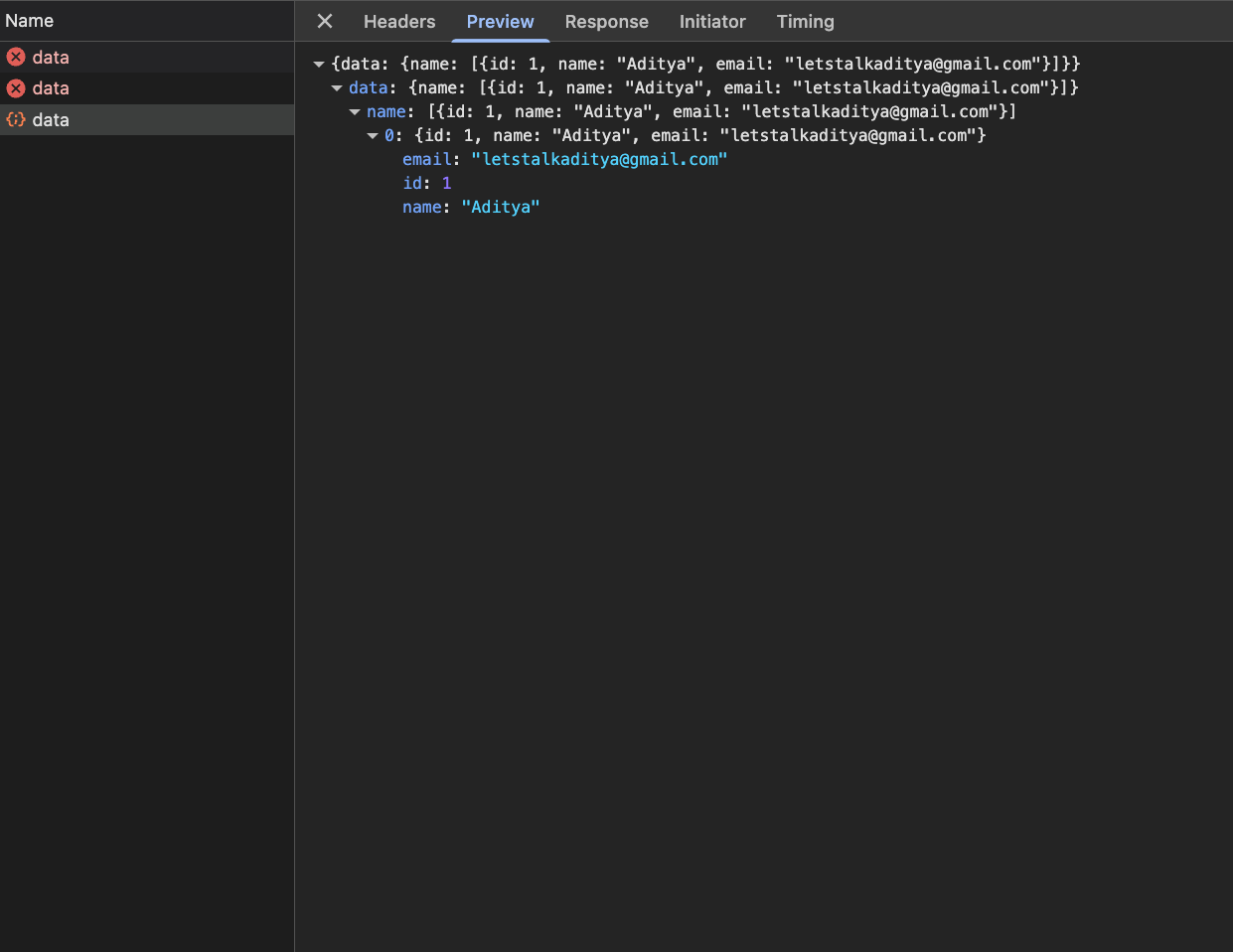
But remember, we have setHeader only for GET request, if we create any other api, we will have to setHeader for other apis as well.
If you want to allow requests from any of the third party websites, you can set the header to '*'.
Checkout more about CORS on the Official Mozilla Guide:
https://developer.mozilla.org/en-US/docs/Web/HTTP/Guides/CORS
Conclusion
CORS is not a bug—it's a browser-enforced security feature built on the same-origin policy. It exists to prevent malicious sites from reading sensitive responses from other origins. When you see a CORS error, it means the browser blocked a cross-origin response because the server didn’t explicitly permit that origin (or the request required a preflight that wasn’t handled).
Key takeaways and practical steps:
Remember the cause: browsers enforce same-origin policy; servers must opt in to share resources.
Know the important response headers:
Access-Control-Allow-Origin,Access-Control-Allow-Methods,Access-Control-Allow-Headers, andAccess-Control-Allow-Credentials. Preflight requests use theOPTIONSmethod.For credentialed requests, never use
*forAccess-Control-Allow-Origin; return the exact origin and setAccess-Control-Allow-Credentials: true.Fixes belong on the server: configure CORS in your backend (or use CORS middleware/packages). For local development, use a trusted proxy or dev-server proxy rather than disabling browser protections.
Debugging tips: check the browser console and the network tab to inspect preflight requests and response headers; reproduce requests with curl to verify server headers.
CORS lets servers control who can access their resources while keeping web clients safe. Configure it intentionally—correctly set headers for the desired clients, and avoid shortcuts that undermine security.